
Freebies · Claude Resources
20 open-source tools: animation and 3D with Claude
From Remotion to FFmpeg: 20 free tools that let Claude Code animate, build 3D, make audio and export video. With licence and start command for each tool.
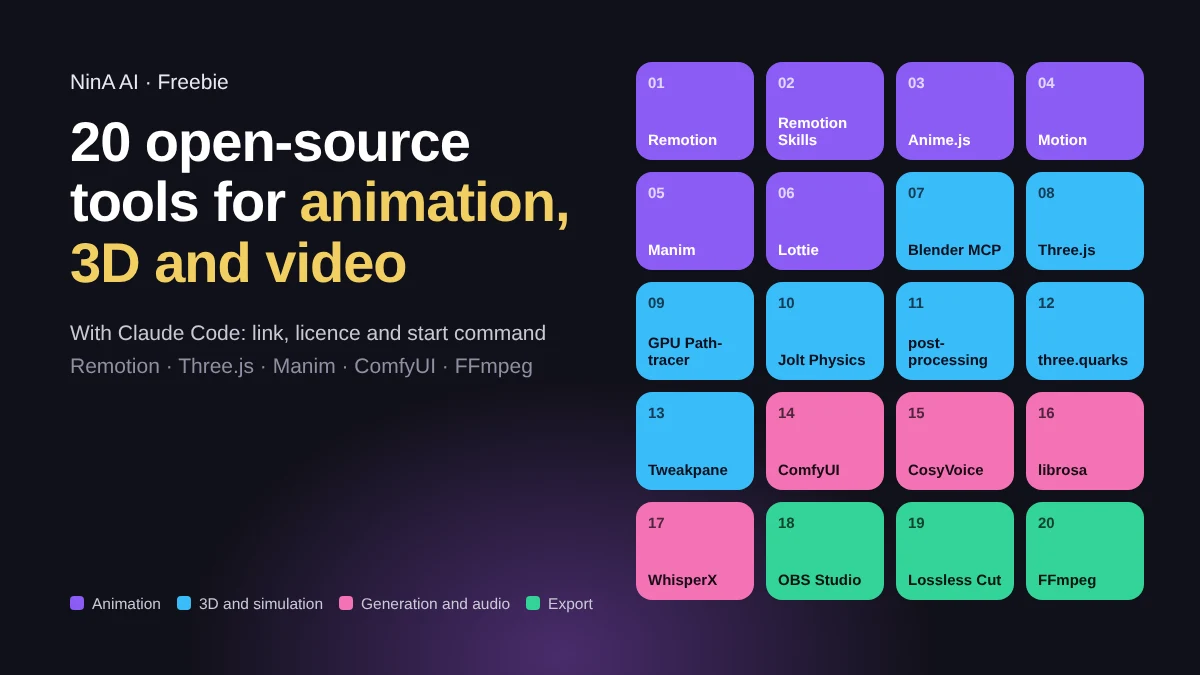
Claude writes code. With these twenty open-source projects, that code becomes an animation, a 3D scene, a voice-over or a video. You give Claude Code the brief, Claude installs and uses the tool. We grouped them in four: animation, 3D and simulation, generation and audio, and recording and export.
Each tool lists its licence. Almost everything is free to use, including commercially. Watch out for Remotion: a company with more than three employees needs a company licence for it.
You are a motion designer and a developer in one. Use [TOOL] to make a [animation / 3D scene / explainer video] about [TOPIC].

- Work in a new folder and install whatever is needed yourself.
- Start with a short outline: scenes, duration and style. Wait for my approval.
- Show a preview after each step that I can open in the browser.
- Keep colours, typeface and pace consistent.
- Export the final result with FFmpeg as an MP4 (H.264, 1080p) and as a GIF of at most 10 MB.
- Tell me at the end which files you made and how I change something.
Animation
- 1
Remotion: video as React code
Every frame is a React component. Claude writes a video the way it writes a web page: text, charts, logos and timing. You render to MP4.
Illustration. A bar chart from 2021 to 2026 builds up with spring animations while the counter at the top rises to +142%. - Licence: Remotion License. Free for individuals, non-profits and companies with up to 3 employees; above that, a company licence.
npx create-video@latest
- 2
Remotion Skills: video skills for your agent
Remotion's official agent skills for Claude Code, Codex and Cursor: best practices for compositions, animations, timing and rendering. They help Claude make fewer mistakes in Remotion code. Then you type, for example, /remotion-create with your idea.
Illustration. In a terminal, /remotion-create is typed; then the skill loads, code is written, rendered, and a first video frame appears. - Licence: part of Remotion (see above).
npx skills add remotion-dev/skills
- 3
Anime.js: animations on a timeline
A lightweight JavaScript library to move elements, SVG and properties in a precise sequence. Useful for logo animations and explainers on a web page.
Real render. Seven blocks drop in with stagger and bounce, ripple through the row and stretch into bars, all on one timeline. - Licence: MIT. Free to use, including commercially.
npm install animejs
- 4
Motion: animation in your interface
Animation library for React and JavaScript, formerly Framer Motion: transitions, gestures, scroll animations and layout transitions.
Real render. A toggle switches on, the card springs to the top and the others shift along. - Licence: MIT. Free to use, including commercially.
npm install motion
- 5
Manim: explainer videos with diagrams and equations
The Python library behind the 3Blue1Brown maths videos, maintained by the community. Claude writes a scene in Python, Manim turns it into a video.
Real render. Axes appear and a dot traces the graph of a function while the area beneath it fills in. - Licence: MIT. Free to use, including commercially.
pip install manim
- 6
Lottie: lightweight vector animations
Plays After Effects vector animations as a small JSON file on the web. Sharp at any size and light enough for a website or app.
Real render. A ring draws itself, a check mark appears and dots burst out; the whole animation is an 8 KB JSON file. - Licence: MIT. Free to use, including commercially.
npm install lottie-web
3D and simulation
- 1
MCP for Blender: Claude builds 3D scenes
Connects Claude to Blender via MCP. Claude creates and edits objects, materials, lighting and camera in an open Blender scene. You also install the Blender add-on; the README explains how.
Illustration. A chat prompt for a product shot becomes a 3D scene step by step: table, white box, soft light and a camera orbiting around it. - Licence: MIT. Free to use, including commercially.
claude mcp add blender uvx mcp-for-blender
- 2
Three.js: 3D in the browser
A widely used library for 3D on the web: scenes, cameras, lighting and materials in JavaScript. The base for the tools below.
Real render. A low-poly planet with clouds, a moon and a ring of cubes, rendered live in the browser. - Licence: MIT. Free to use, including commercially.
npm install three
- 3
Three GPU Pathtracer: realistic light
GPU path tracing for Three.js: realistic lighting, shadows and reflections, right in the browser.
Real render. The path tracer adds up samples: the image goes from grainy noise to soft shadows and true reflections in glossy spheres. - Licence: MIT. Free to use, including commercially.
npm install three-gpu-pathtracer
- 4
Jolt Physics: collisions and gravity
A C++ physics engine for collisions, rigid and soft bodies, used in games such as Horizon Forbidden West. For the web there is a WebAssembly version: JoltPhysics.js.
Real render. A heavy ball smashes into a wall of blocks; Jolt computes how they fall, collide and come to rest (with JoltPhysics.js). - Licence: MIT. Free to use, including commercially.
- 5
postprocessing: bloom, depth of field and colour
Post-processing effects for Three.js. It gives a 3D scene the glow, blur and colour grading of a film.
Real render. The same neon scene without bloom on the left and with bloom on the right; a moving divider shows the difference. - Licence: Zlib. Free to use, including commercially.
npm install three postprocessing
- 6
three.quarks: particles and effects
Particle systems for Three.js: fire, smoke, sparks and trails, for visual effects in a scene.
Real render. A fountain of sparks that shoot up, fall under gravity and bounce off the floor. - Licence: MIT. Free to use, including commercially.
npm install three.quarks
- 7
Tweakpane: controls for your scene
A small control panel with sliders, colour pickers and buttons. Adjust speed, colour or camera live without touching the code.
Real render. A slider in the Tweakpane panel twists and recolours the 3D object live. - Licence: MIT. Free to use, including commercially.
npm install tweakpane
Generation and audio
- 1
ComfyUI: generate images and video with nodes
An interface for image and video generation with open models. You build a workflow as a diagram of nodes and can run it again and again.
Illustration. A node graph sends a photo and a prompt through a model and returns four variants on four backgrounds. - Licence: GPL-3.0. Free to use; if you distribute a modified version, it falls under GPL too.
- Also check the licence of every model you load into it.
pip install comfy-cli
comfy install
- 2
CosyVoice: multilingual voice-overs
A text-to-speech model for voice-overs in several languages, including a voice based on a short sample. Install it with the steps in the README.
Illustration. An English sentence lights up word by word while the spoken waveform builds up underneath. - Licence: Apache 2.0. Free to use, including commercially.
- Only use someone's voice with their permission.
- 3
librosa: animation on the beat
A Python library for audio analysis. Claude extracts tempo and beats, so your animation runs exactly on the music.
Real render. librosa finds the tempo (120 BPM) and the beats in a 6-second clip; a circle pulses on every beat. - Licence: ISC. Free to use, including commercially.
pip install librosa
- 4
WhisperX: subtitles word by word
Speech recognition with word-level timestamps and speaker detection: the base for subtitles that keep exact pace, as in short social media videos.
Illustration. Subtitles in which each word lights up at its own timestamp, with a word-by-word timeline underneath. - Licence: BSD 2-Clause. Free to use, including commercially.
pip install whisperx
Recording and export
- 1
OBS Studio: screen recording
Recording and streaming software for your screen, camera and audio. Handy for recording a demo or the preview of your animation.
Illustration. A screen recording: desktop with an app, a round webcam bubble in the corner and a running timer. - Licence: GPL-2.0. Free to use.
- 2
LosslessCut: cut without re-encoding
Cuts and joins video and audio without re-encoding. Fast, and with no loss of quality.
Illustration. Two parts of a video strip are cut out and the rest joins up, without re-encoding. - Licence: GPL-2.0. Free to use.
- 3
FFmpeg: encoding and export
The engine under a lot of video software: converting, compressing, joining and exporting to MP4, GIF or WebM from the command line. Claude writes the commands for you; this turns a recording into an MP4 that plays everywhere.
Real render. FFmpeg turns a test pattern into an MP4 and a GIF; the file sizes and the result on the right come from that real run. - Licence: LGPL 2.1 or later; some optional parts fall under GPL. Free to use.
ffmpeg -i opname.mov -c:v libx264 -crf 20 -pix_fmt yuv420p video.mp4
How to start
- Pick one goal: a short product video, an animated chart, a 3D scene or an explainer video.
- Pick one tool for it: Remotion or Anime.js for video and animation, Three.js for 3D, Manim for explainers.
- Give Claude Code the starter prompt at the top of this page, with the tool and your topic filled in.
- Only then add sound, subtitles or effects, and export with FFmpeg.
The selection comes from an overview by @e1genqq on X. We checked the explanations, licences and commands in the repos ourselves (31 October 2026). Licences can change: check the repo before you use something commercially.